Tuesday, February 5, 2013

Saturday, January 19, 2013
Broadcasting live from our school studio!
I am really proud of our school news show. I started out without a clue, but things have turned out nicely after four years of winging it. I thought I'd share a little bit of how we run our live school news show in hopes of helping out anyone else that finds themselves in the same situation I was in a few years ago (new to working in a school environment without any prior video or technology experience and knowing zilch about putting together a news show. Yea, that was me :)).
Our school news crew is made up of seventh and eighth grade students. At the start of the school year, students interested in becoming part of the school news team pick up an application and teacher recommendation form. I schedule interviews with the technology crew applicants and auditions for anchor applicants. Once the students are selected, I create a rotation schedule for the anchors and technology crew members. I rotate my anchors every 6-8 weeks. I usually rotate my technology crew members by semester. The exiting news crew members trains the incoming news crew members. Once a news crew member completes his/her turn on the news show, I may call on them to fill in whenever another crew member is absent.
The nice thing about having seventh grade students on the news team is that I ask them to start the news show the first week of school during their eighth grade year. These same students also train the new students that join the team that school year. The students run the news show and I'm there to make sure everyone stays on track and nothing too crazy happens. So far, I've been really pleased with how responsible and professional our students are about the news program.
Here are the roles and tasks for the news crew member:
News anchors: These two students write the weather announcement and national/world news announcement each morning. I proofread their announcements before we go live on air.

Teleprompter technician: This student transcribes all of our announcements onto PowerPoint slides that the news anchors will read from.

Video technician: This student creates the visuals that will accompany the announcements. He/She will also be responsible for transitioning between the our news anchors, special guests and visuals (videos and images).
Sound technician: This student controls the mics and sound board. I usually place a second year news show team member in this role. Each year I usually have at least one student that does not stop showing up for the news show and he/she has also taken the initiative to learn all three technician roles. Having this student on the team really helps because I'm confident that things will go well with the news show even when I am away.

Equipment & tools:
When I first started working on the news show, I trolled the web for ideas. The Daring Librarian Gwyneth Jones has a wiki with lots of information. Check it out!
Google docs has been a great tool because I can easily create, update and share information with the news team. The news team accesses a Google doc for the script where I collect announcements sent via email to me from our school staff. I also use our school newsletter to collect news. The news anchors update the script each morning with the weather report & news piece. The teleprompter tech creates a Powerpoint from the script all the while everyone is able to edit/view without having to print out a new script. I also use a Google Form to collect song requests from our school community (I stole this idea from the Daring Librarian :)). My video technician checks a separate Google doc titled 'BMS Music Sheet' to learn what song to play each day.
We play music and videos each day on the news show. I use the thumbdrive to hold the songs and videos for each week. We play a booktrailer each Thursday. I may use a booktrailer from Youtube or a student may submit a video he/she created. I play Animoto videos that I create to advertise different events in our school. (With an educator account in Animoto, I'm able to download my Animoto video as an .mp4 file.) Sometimes I give the news crew a flip camera and a question to ask their fellow classmates to create "Word on the Street" videos. I only have five minutes (maybe seven minutes if I push the envelope) of air time, so I can't get too crazy.
If you run a school news show, I would love to hear about what you do!
Our school news crew is made up of seventh and eighth grade students. At the start of the school year, students interested in becoming part of the school news team pick up an application and teacher recommendation form. I schedule interviews with the technology crew applicants and auditions for anchor applicants. Once the students are selected, I create a rotation schedule for the anchors and technology crew members. I rotate my anchors every 6-8 weeks. I usually rotate my technology crew members by semester. The exiting news crew members trains the incoming news crew members. Once a news crew member completes his/her turn on the news show, I may call on them to fill in whenever another crew member is absent.
The nice thing about having seventh grade students on the news team is that I ask them to start the news show the first week of school during their eighth grade year. These same students also train the new students that join the team that school year. The students run the news show and I'm there to make sure everyone stays on track and nothing too crazy happens. So far, I've been really pleased with how responsible and professional our students are about the news program.
Here are the roles and tasks for the news crew member:
News anchors: These two students write the weather announcement and national/world news announcement each morning. I proofread their announcements before we go live on air.
Teleprompter technician: This student transcribes all of our announcements onto PowerPoint slides that the news anchors will read from.
Video technician: This student creates the visuals that will accompany the announcements. He/She will also be responsible for transitioning between the our news anchors, special guests and visuals (videos and images).
Sound technician: This student controls the mics and sound board. I usually place a second year news show team member in this role. Each year I usually have at least one student that does not stop showing up for the news show and he/she has also taken the initiative to learn all three technician roles. Having this student on the team really helps because I'm confident that things will go well with the news show even when I am away.
Equipment & tools:
- Desktop computer to create & display visuals
- Small TV monitor to see what we are displaying to our audience
- Sound board
- Video mixer to transition between our desktop and video cameras
- Two video cameras
- wireless microphones and hand held microphones
- Two laptops (one for the teleprompter tech & one for the news anchors)
- TV set
- Google Docs
- Gmail
- Thumbdrive- we use one very important & precious thumbdrive to hold our videos, pictures & music for the news show.
When I first started working on the news show, I trolled the web for ideas. The Daring Librarian Gwyneth Jones has a wiki with lots of information. Check it out!
Google docs has been a great tool because I can easily create, update and share information with the news team. The news team accesses a Google doc for the script where I collect announcements sent via email to me from our school staff. I also use our school newsletter to collect news. The news anchors update the script each morning with the weather report & news piece. The teleprompter tech creates a Powerpoint from the script all the while everyone is able to edit/view without having to print out a new script. I also use a Google Form to collect song requests from our school community (I stole this idea from the Daring Librarian :)). My video technician checks a separate Google doc titled 'BMS Music Sheet' to learn what song to play each day.
We play music and videos each day on the news show. I use the thumbdrive to hold the songs and videos for each week. We play a booktrailer each Thursday. I may use a booktrailer from Youtube or a student may submit a video he/she created. I play Animoto videos that I create to advertise different events in our school. (With an educator account in Animoto, I'm able to download my Animoto video as an .mp4 file.) Sometimes I give the news crew a flip camera and a question to ask their fellow classmates to create "Word on the Street" videos. I only have five minutes (maybe seven minutes if I push the envelope) of air time, so I can't get too crazy.
If you run a school news show, I would love to hear about what you do!
Friday, November 30, 2012
Edublog nomination, Literary Cafe and "The Outsiders"
Edublog nominations were due last week and my friend & fellow SC library media specialist Tamara Cox nominated my little blog for 'Best New Blog.' How cool is that?!?
I'm very, very flattered!! I had to post a screenshot of her tweet just to make sure I was not making it up :)

Speaking of Mrs. Cox, she recently blogged about an activity in her library called a Literary Cafe. After reading her post, I approached a seventh grade Language Arts teacher at my school to ask if she was interested in trying this activity out with her students. Her class is reading "The Outsiders" and a literary cafe would be a great way to tie in videos & informational text with several of the topics addressed in the book.
Here are the stations and activities we came up with:

1. Crime- Our School Resource Officer (SRO) talked with our students about gangs, crime, and self defense. Students wrote a reflection about what they learned.

2. Health- Students watched Brainpop videos about smoking and drinking. Students took notes while they watched the videos. After watching the videos, students created word clouds using the main ideas and facts about the health risks involved with smoking and drinking.

3. 1960s- Students watched video clips about life in the 1960s. I found some great video clips on Discovery Education about entertainment, sports, Science and government news during the 1960s. While watching the videos, students took notes about important events and people from the 1960s. Next, students went online to find images to create collages about the 1960s using PicMonkey.

4. High School Dropout rate- Students read articles from DISCUS and reviewed our districts' annual report card. Students also reviewed the interactive dropout map on Boostup to learn the high school drop out rate for our state and nation. After reviewing the website and articles, students created a graph to show the overall dropout rate of our country, state and school district.

5. Family Court- Students read news articles and encyclopedia articles from DISCUS that shared information about juvenile court, child abuse and sibling guardians. Students wrote a persuasive argument after reading the articles.
Students were engaged. We were able to help students 1:1. Students were reading, writing and creating visuals. I look forward to trying this out with our sixth graders next. Please feel free to share some ways you are tying fictional text and informational text in your libraries/classrooms.
I'm very, very flattered!! I had to post a screenshot of her tweet just to make sure I was not making it up :)

Speaking of Mrs. Cox, she recently blogged about an activity in her library called a Literary Cafe. After reading her post, I approached a seventh grade Language Arts teacher at my school to ask if she was interested in trying this activity out with her students. Her class is reading "The Outsiders" and a literary cafe would be a great way to tie in videos & informational text with several of the topics addressed in the book.
Here are the stations and activities we came up with:

1. Crime- Our School Resource Officer (SRO) talked with our students about gangs, crime, and self defense. Students wrote a reflection about what they learned.

2. Health- Students watched Brainpop videos about smoking and drinking. Students took notes while they watched the videos. After watching the videos, students created word clouds using the main ideas and facts about the health risks involved with smoking and drinking.

3. 1960s- Students watched video clips about life in the 1960s. I found some great video clips on Discovery Education about entertainment, sports, Science and government news during the 1960s. While watching the videos, students took notes about important events and people from the 1960s. Next, students went online to find images to create collages about the 1960s using PicMonkey.

4. High School Dropout rate- Students read articles from DISCUS and reviewed our districts' annual report card. Students also reviewed the interactive dropout map on Boostup to learn the high school drop out rate for our state and nation. After reviewing the website and articles, students created a graph to show the overall dropout rate of our country, state and school district.

5. Family Court- Students read news articles and encyclopedia articles from DISCUS that shared information about juvenile court, child abuse and sibling guardians. Students wrote a persuasive argument after reading the articles.
Students were engaged. We were able to help students 1:1. Students were reading, writing and creating visuals. I look forward to trying this out with our sixth graders next. Please feel free to share some ways you are tying fictional text and informational text in your libraries/classrooms.
Tuesday, November 6, 2012
Themed Book Trailers
Book talks, book trailers and book displays are rolled up into one with a theme. I read this post by Mrs. ReaderPants that got me thinking about how I put together my book talks. Today I came across this post on the same blog that inspired me to put together a themed book trailer.
We currently have up a book display of series similar to The Hunger Games. We used this post found via Pinterest (of course) to help us put it together. All I had to do next was find book cover images and write very, very brief snippets for each title. Hopefully, after watching the themed book trailer on the morning show, students will come in to check out one or more of the titles featured instead of just one title. I can save the full length book trailer for class visits or other activities.
I'm looking forward to creating more themed book trailers to help feature fiction and nonfiction titles in our collection. Animoto definitely makes it easy.
We currently have up a book display of series similar to The Hunger Games. We used this post found via Pinterest (of course) to help us put it together. All I had to do next was find book cover images and write very, very brief snippets for each title. Hopefully, after watching the themed book trailer on the morning show, students will come in to check out one or more of the titles featured instead of just one title. I can save the full length book trailer for class visits or other activities.
I'm looking forward to creating more themed book trailers to help feature fiction and nonfiction titles in our collection. Animoto definitely makes it easy.
Monday, November 5, 2012
Smore library news...
The first quarter of the school year has flown by. As I thought about how to share with my administrators what we have been up to in the media center so far this school year, I remembered reading about Smore. Please check out these beautiful Smore pages created by fellow library media specialists: here, here and here.
The news letter below was quick and easy to create. After sending a link to the newsletter to my administrators, they commented positively on what they read. This is good stuff.
The news letter below was quick and easy to create. After sending a link to the newsletter to my administrators, they commented positively on what they read. This is good stuff.
Friday, September 7, 2012
Getting to know our students
We completed our library orientations our first full week of school. It was great to see our students and talk about books. So many of them talked about how much they enjoyed reading our SC Junior Book Award nominee books this summer. We also talked about their favorite books and genres. "Hunger Games" continues to be a favorite, along with mystery, sports, horror and drama books.
In an effort to learn the reading interests of our students, I asked them to fill out a survey. I plan to use the data collected to help develop library displays, book orders, book talks and book trailers. I started off by brainstorming some questions, reading this post and this post to help me develop my own survey. I wanted to keep it short and sweet. The students completed a paper copy. I will enter the data into a Google form that I will share with our ELA teachers. This may take a while, but it will be worth it. It will give us quick access to student responses without having to shuffle around sheets of papers.
In an effort to learn the reading interests of our students, I asked them to fill out a survey. I plan to use the data collected to help develop library displays, book orders, book talks and book trailers. I started off by brainstorming some questions, reading this post and this post to help me develop my own survey. I wanted to keep it short and sweet. The students completed a paper copy. I will enter the data into a Google form that I will share with our ELA teachers. This may take a while, but it will be worth it. It will give us quick access to student responses without having to shuffle around sheets of papers.
Reader interest survey from Lorena Swetnam
Please share ways you learn about your students in the library.
Please share ways you learn about your students in the library.
Saturday, September 1, 2012
Getting the library ready
I was also inspired by blog posts by SC media specialists Kristen Hearne and Tamara Cox with display ideas & graphics. Reading their blog posts and viewing their images, inspired me to use my flickr account that has been dormant for a few years. I'm going to try to post pics from the library to my account.
Our media assistant is super crafty, creative & not afraid to use a hot glue gun (you'll see what I mean in a second). I am so thankful to work with her and have her help in the media center. Here are some pictures of our current library displays:
 |
| Pens & sticky notes are on the shelf for teachers & students to share books they read over the summer. |
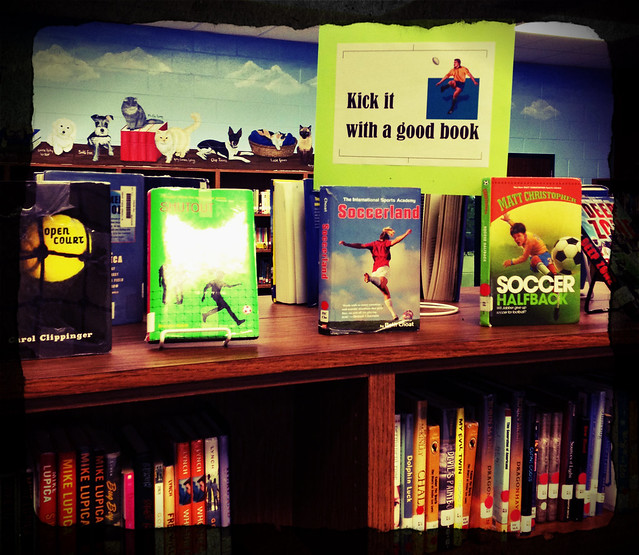 | ||
Sports display with a sign that reads, "Kick it with a good book."
|
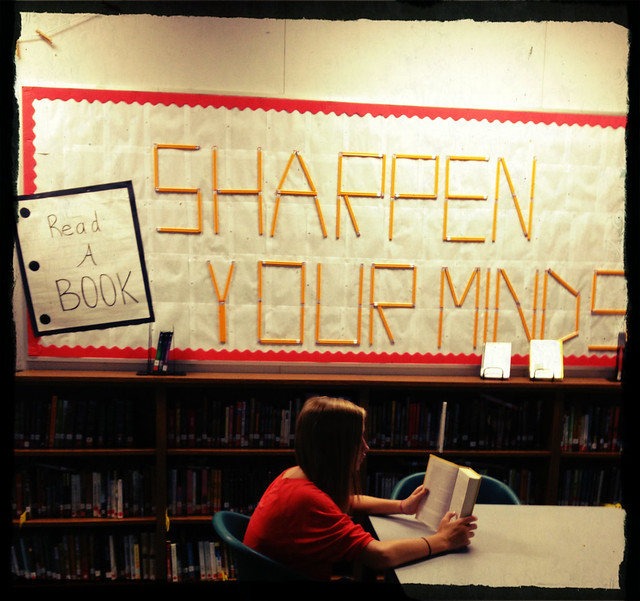
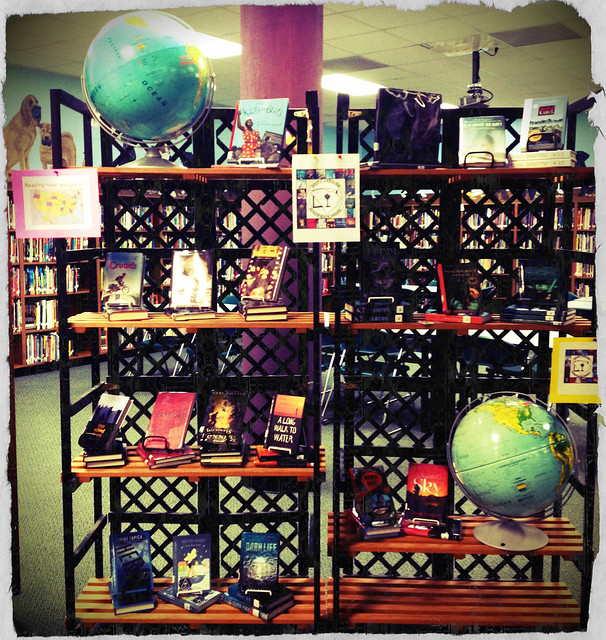 |
| Our SC Junior Book Award nominee list display.
Not everyone is on pinterest. At least not yet. Here is a short list of sites I bookmarked with ideas for future library displays:
|
This year I want to create more interactive displays and smaller displays featuring genres and read alike titles. I think this will be easier to keep up with and will keep the library interesting for our visitors.
Please share your library display ideas!
Subscribe to:
Posts (Atom)